December 07, 2025
8 min read
By Kokil Thapa | Last reviewed: April 2026
The database architecture decision is the single most expensive mistake you can make when building a SaaS platform. Choose the wrong model early, and you face months of painful migration later — data leaks, performance bottlenecks, or infrastructure costs that destroy your margins. As a web developer in Nepal who has built multi-tenant systems for clients across fintech, legal tech, and e-commerce, I have seen each model succeed and fail in production. This guide covers the four multi-tenant database patterns — shared schema, separate schemas, dedicated databases, and hybrid — with practical decision criteria, performance optimization strategies, and Laravel implementation patterns for 2026.
Quick Answer — Which Database Architecture Should You Choose?
For MVPs and early-stage SaaS: single database with shared schema (tenant_id column). For B2B SaaS with medium-sized clients: separate schemas per tenant. For enterprise, fintech, or compliance-heavy SaaS: dedicated database per tenant. For growth-stage SaaS: hybrid model — shared DB for free/starter plans, dedicated DB for enterprise clients. The hybrid approach is the gold standard in 2026.
What Are the Four Multi-Tenant Database Models?
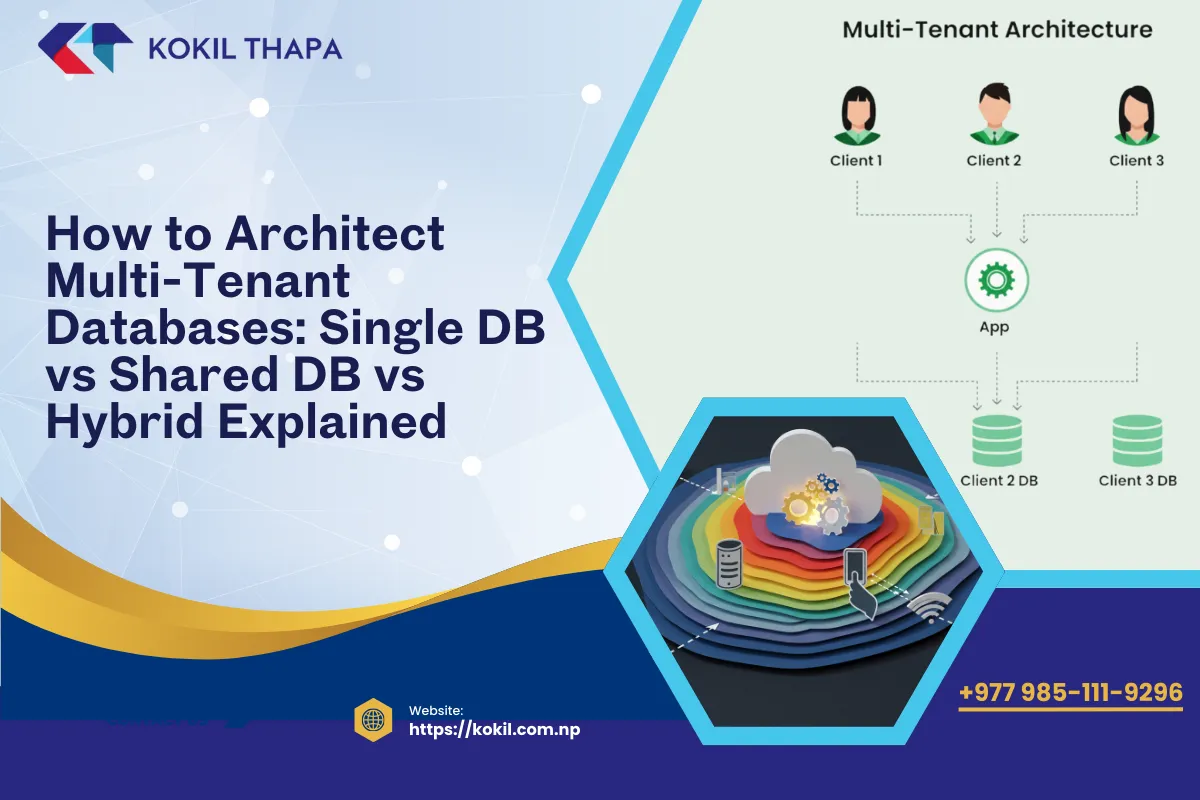
Every multi-tenant database architecture falls into one of four patterns. Each trades off between isolation, cost, complexity, and scalability.
| Model | Isolation | Cost | Complexity | Best For |
|---|---|---|---|---|
| Shared Schema | Low (tenant_id column) | Lowest | Low | MVPs, startups, small tenants |
| Separate Schemas | Medium (per-tenant tables) | Medium | Medium | B2B SaaS, mid-size tenants |
| Dedicated Databases | Highest (per-tenant DB) | Highest | High | Enterprise, compliance |
| Hybrid | Variable (tier-based) | Optimized | High | Growth-stage SaaS |
How Does the Shared Schema Model Work?
The simplest approach: all tenants share the same database tables. Every row includes a tenant_id column that scopes queries to the correct tenant.
-- Example: users table with tenant scoping
SELECT * FROM users WHERE tenant_id = 42 AND is_active = 1;

-- Every table follows the same pattern
CREATE TABLE orders (
    id BIGINT UNSIGNED AUTO_INCREMENT PRIMARY KEY,
    tenant_id BIGINT UNSIGNED NOT NULL,
    user_id BIGINT UNSIGNED NOT NULL,
    total DECIMAL(10,2),
    created_at TIMESTAMP,
    INDEX idx_tenant_created (tenant_id, created_at)
);
Advantages
- Lowest infrastructure cost — one database server, one backup job, one monitoring setup
- Simplest to build — standard Laravel models with a global scope on tenant_id
- Single migration path — schema changes apply to all tenants immediately
- Easy cross-tenant reporting — all data lives in one place
Disadvantages
- Data leak risk — one missing
WHERE tenant_id = ?clause exposes another tenant's data - Performance degradation at scale — tables with millions of rows across thousands of tenants require careful indexing and partitioning
- Noisy neighbor problem — one tenant's heavy queries affect all other tenants
- Harder compliance — GDPR right-to-erasure requires deleting scattered rows instead of dropping a schema
When to Use
Early-stage SaaS, MVPs, applications with small homogeneous tenants, and systems where tenants have similar data volumes and access patterns.
How Does the Separate Schema Model Work?
Each tenant gets its own database schema (or table prefix) within the same database server. The application switches schema context based on the authenticated tenant.
-- Tenant 1's tables
tenant_acme.users
tenant_acme.orders
tenant_acme.invoices

-- Tenant 2's tables
tenant_globex.users
tenant_globex.orders
tenant_globex.invoices

-- Central tables (shared)
central.tenants
central.plans
central.billing
Advantages
- Stronger isolation — physically separate tables eliminate the risk of cross-tenant data leaks from missing WHERE clauses
- Per-tenant backup and restore — export or restore a single tenant's data without affecting others
- Better performance for large tenants — queries operate on smaller, tenant-specific tables
- Easier GDPR compliance — drop a tenant's entire schema to fulfill data deletion requests
Disadvantages
- Schema management complexity — migrations must run against every tenant's schema individually
- Schema explosion — not practical beyond ~500 tenants due to metadata overhead
- Cross-tenant analytics is harder — querying across multiple schemas requires UNION or data warehouse
When to Use
B2B SaaS with medium-to-large tenants, applications where clients expect data isolation, and industries like legal tech, accounting, and financial services.
How Does the Dedicated Database Model Work?
Each tenant gets a completely separate database instance. The application resolves the correct database connection dynamically at runtime.
// Laravel dynamic database switching
config(['database.connections.tenant' => [
    'driver'   => 'mysql',
    'host'     => $tenant->db_host,
    'database' => $tenant->db_name,
    'username' => $tenant->db_user,
    'password' => decrypt($tenant->db_password),
]]);

DB::purge('tenant');
DB::reconnect('tenant');
Advantages
- Maximum isolation — no possibility of cross-tenant data access at the database level
- Independent performance tuning — allocate more resources to high-traffic tenants
- Compliance-ready — meets GDPR, HIPAA, PCI-DSS, and data residency requirements
- Independent scaling — move high-traffic tenant databases to separate servers or regions
- Clean disaster recovery — restore a single tenant's database without affecting others
Disadvantages
- Highest infrastructure cost — each database requires server resources, backup jobs, and monitoring
- Connection pooling complexity — managing hundreds or thousands of database connections requires ProxySQL or PgBouncer
- Migration automation required — deploying schema changes across all tenant databases must be fully automated
- Cross-tenant analytics — requires a separate data warehouse aggregating from all tenant databases
When to Use
Enterprise SaaS, fintech, healthcare, government, legal tech, and any application where regulatory compliance mandates strict data segregation.
What Is Hybrid Multi-Tenant Architecture and Why Is It the 2026 Standard?
Hybrid architecture combines multiple models based on tenant tier, allowing you to optimize cost for small tenants while providing enterprise-grade isolation for premium clients.
// Hybrid tenant resolution
if ($tenant->plan === 'enterprise') {
    // Dedicated database connection
    $this->connectToDedicatedDB($tenant);
} else {
    // Shared database with tenant_id scoping
    $this->setTenantScope($tenant->id);
}
How It Works
- Free/Starter tenants → shared database with tenant_id column (lowest cost)
- Business tenants → separate schema within a shared server (moderate isolation)
- Enterprise tenants → dedicated database with optional dedicated server (maximum isolation)
- Central database → tenant metadata, billing, plan configuration (always shared)
Benefits of Hybrid
- Cost-efficient for the majority of tenants while meeting enterprise requirements
- Natural upgrade path — migrate tenants to higher isolation tiers as they upgrade plans
- Multi-region support — place enterprise tenant databases in geographic regions matching their data residency requirements
- Flexible pricing — isolation level becomes a billable feature
The hybrid model has become the gold standard for growth-stage SaaS in 2026 because it aligns infrastructure cost with revenue per tenant.
How Do You Optimize Performance in Multi-Tenant Databases?
Regardless of which architecture model you choose, these optimization techniques are essential for production multi-tenant systems.
Indexing Strategy
For shared schema databases, always create composite indexes with tenant_id as the leading column:
-- GOOD: tenant_id leads the composite index
CREATE INDEX idx_orders_tenant_date ON orders (tenant_id, created_at);
CREATE INDEX idx_users_tenant_email ON users (tenant_id, email);

-- BAD: tenant_id is not in the index
CREATE INDEX idx_orders_date ON orders (created_at);
Table Partitioning
For tables exceeding 50–100 million rows, partition by tenant_id or by date range to keep query performance consistent:
ALTER TABLE activity_logs PARTITION BY HASH(tenant_id) PARTITIONS 64;
Read Replicas
Route reporting and analytics queries to read replicas. Never let heavy analytical queries compete with transactional workloads on the primary database. Laravel's database read/write splitting makes this straightforward.
Redis Caching
Cache tenant metadata (plan, settings, feature flags) in Redis to avoid database lookups on every request:
$settings = Cache::remember("tenant_{$id}_settings", 3600, function () use ($id) {
    return TenantSetting::where('tenant_id', $id)->get();
});
Connection Pooling
For dedicated database architectures with hundreds of tenants, use connection pooling (ProxySQL for MySQL, PgBouncer for PostgreSQL) to manage database connections efficiently without exhausting server limits.
How Do You Implement Multi-Tenancy in Laravel?
Laravel's ecosystem provides mature tools for all four architecture models.
stancl/tenancy — The Production Standard
The most robust package for Laravel multi-tenancy. Supports shared database, separate schema, and dedicated database models. Provides automatic tenant provisioning, migration management, tenant-aware caching/queues/filesystem, and event lifecycle hooks. See our detailed guide on building multi-tenant SaaS applications in Laravel for full implementation details.
Custom Middleware for Lightweight Tenancy
For simple shared-schema tenancy, a custom middleware with global scopes is sufficient:
// TenantMiddleware.php
public function handle($request, Closure $next)
{
    $tenant = Tenant::where('slug', $request->route('tenant'))->firstOrFail();
    app()->instance('tenant', $tenant);
    return $next($request);
}

// BelongsToTenant Trait
protected static function booted()
{
    static::addGlobalScope('tenant', function ($query) {
        $query->where('tenant_id', app('tenant')->id);
    });

    static::creating(function ($model) {
        $model->tenant_id = app('tenant')->id;
    });
}
Vapor + Aurora Serverless
For serverless multi-tenant SaaS, Laravel Vapor on AWS Lambda paired with Aurora Serverless provides auto-scaling databases that adjust capacity based on demand. This architecture works well with the hybrid model — small tenants share an Aurora cluster while enterprise tenants get dedicated Aurora instances. For more on serverless deployment, see our guide on serverless Laravel on AWS Lambda.
Decision Guide — Choosing the Right Model
| Your Situation | Recommended Model | Why |
|---|---|---|
| Building an MVP or prototype | Shared Schema | Fastest to build, lowest cost, iterate quickly |
| 500+ small tenants with similar data | Shared Schema | Cost-efficient, simple migration path |
| 50–500 B2B tenants, moderate data | Separate Schemas | Stronger isolation, per-tenant backup |
| Enterprise clients with compliance needs | Dedicated Databases | Maximum isolation, meets regulatory requirements |
| Mixed tenant sizes (free + enterprise) | Hybrid | Aligns cost with revenue per tenant |
| Legal, fintech, or healthcare SaaS | Dedicated or Hybrid | GDPR, HIPAA, PCI-DSS compliance |
| Multi-region SaaS deployment | Hybrid | Data residency requirements per region |
The key principle: start simple and migrate upward as business requirements demand. A shared schema MVP that proves product-market fit is infinitely more valuable than an over-engineered dedicated database system that never launches.
If you need help choosing and implementing the right multi-tenant database architecture for your SaaS platform, get in touch. I work with SaaS founders and development teams building scalable API-driven applications.
Frequently Asked Questions
Multi-tenant database architecture is a design pattern where one application serves multiple customers while keeping their data isolated.
The shared schema model with a tenant_id column is cheapest — one database, one server, one backup job.
Dedicated databases per tenant provide the strongest isolation and highest security guarantees.
Shared schema puts all tenant data in the same tables with a tenant_id column for filtering. Separate schema gives each tenant their own set of tables within the same database server. Shared schema is simpler and cheaper but has weaker isolation. Separate schema provides better data separation and per-tenant backup/restore but adds migration complexity.
Use dedicated databases when you need strict data isolation for compliance (GDPR, HIPAA, PCI-DSS), when enterprise clients require it contractually, when tenants have vastly different performance requirements, or when data residency laws mandate geographic separation. The higher infrastructure cost is justified by regulatory compliance and enterprise client requirements.
Hybrid architecture combines multiple tenancy models based on tenant tier. Free or small tenants share a database with tenant_id scoping (lowest cost), while enterprise tenants get dedicated databases (maximum isolation). This approach aligns infrastructure cost with revenue per tenant and has become the standard for growth-stage SaaS platforms in 2026.
Use Laravel global scopes on every tenant model to automatically add tenant_id conditions to all queries. Additionally, validate resource ownership in authorization policies, never allow unscoped queries in tenant context, and implement automated tests that verify tenant isolation. A missing WHERE clause is the most common source of cross-tenant data exposure.
Separate migrations into central and tenant categories. Central migrations run once on the shared database for tables like tenants, plans, and billing. Tenant migrations run on every tenant's schema or database. With stancl/tenancy, the command php artisan tenants:migrate automatically applies pending migrations across all tenant databases. Migration automation is critical for systems with hundreds of tenants.
Yes, but it requires careful planning. The process involves creating individual databases for target tenants, migrating their data from shared tables, updating tenant resolution to use the new database, and running both systems in parallel during transition. Design your application with this possibility in mind from the start by abstracting tenant scoping behind interfaces.
Create composite indexes with tenant_id as the leading column on all tenant-scoped tables. Partition large tables (50M+ rows) by tenant_id using hash partitioning. Route reporting queries to read replicas. Cache frequently accessed tenant metadata in Redis. Monitor slow queries per tenant to identify noisy neighbors before they affect other tenants.
The noisy neighbor problem occurs when one tenant's heavy database usage (large queries, bulk imports, complex reports) degrades performance for all other tenants sharing the same database. Solutions include query timeouts per tenant, connection pooling limits, dedicated read replicas for heavy workloads, and upgrading high-usage tenants to dedicated databases.
Connection pooling tools like ProxySQL (MySQL) or PgBouncer (PostgreSQL) maintain a pool of reusable database connections that the application shares across requests. For dedicated database tenancy with hundreds of databases, connection pooling prevents exhausting server connection limits. Without pooling, each tenant connection consumes server memory even when idle.
GDPR requires the ability to completely delete a tenant's data on request — easier with dedicated databases. HIPAA mandates strict access controls and audit trails for healthcare data. PCI-DSS requires isolation of payment card data. Data residency laws may require tenant data storage in specific geographic regions. For compliance-heavy industries, dedicated databases or hybrid architecture is recommended.
For shared schema, cross-tenant analytics is straightforward since all data is in one database. For separate schemas or dedicated databases, build a data warehouse that aggregates data from all tenant sources using ETL pipelines. Tools like Amazon Redshift, BigQuery, or a dedicated analytics database running scheduled imports work well. Never run heavy analytical queries directly against production tenant databases.
stancl/tenancy is the production standard for Laravel multi-tenancy. It supports shared database, separate schema, and dedicated database models with automatic tenant provisioning, dynamic database switching, tenant-aware migrations, caching, queues, and filesystem isolation. Combined with Laravel Cashier for billing and Spatie Permission for RBAC, it provides a complete multi-tenant SaaS foundation.
0 Comments
Leave a comment
Your email is not published. Comments appear once they have been read. Sign in to have your details filled in.